
The GTM Repository: Build Your Claude Code GTM Brain
A practical guide to building a GTM repository for Claude - with a GitHub repo for you to copy
This newsletter is sponsored by Influ2.
50% of software buying decisions involve 5 or more people - and 66% of those buyers shift priorities mid-process. Yet most ABM motions still roll everything up to a single account score and treat the entire buying committee the same way.
The result? Sales reaches out to the wrong stakeholders with irrelevant messaging. Real champions go untouched. And “orchestration” becomes just a workflow that ran.
To help you navigate this complexity, Influ2 is hosting a live panel on Tuesday, May 6 - with Devin Reed (The Reeder) and Ed VanderBush (LiveRamp). They’ll break down the 3 failure points that silently kill buyer momentum - latency, fake personalization, and false attribution - and what contact-level ABM looks like in practice.
If you’re serious about orchestrating GTM around how buyers actually buy, don’t miss this one.
Dear GTM strategist!
Claude has 10x-ed its revenue in 10 months (ChatGPT “only” 2.5x-ed it) and it took our LinkedIn by the storm.
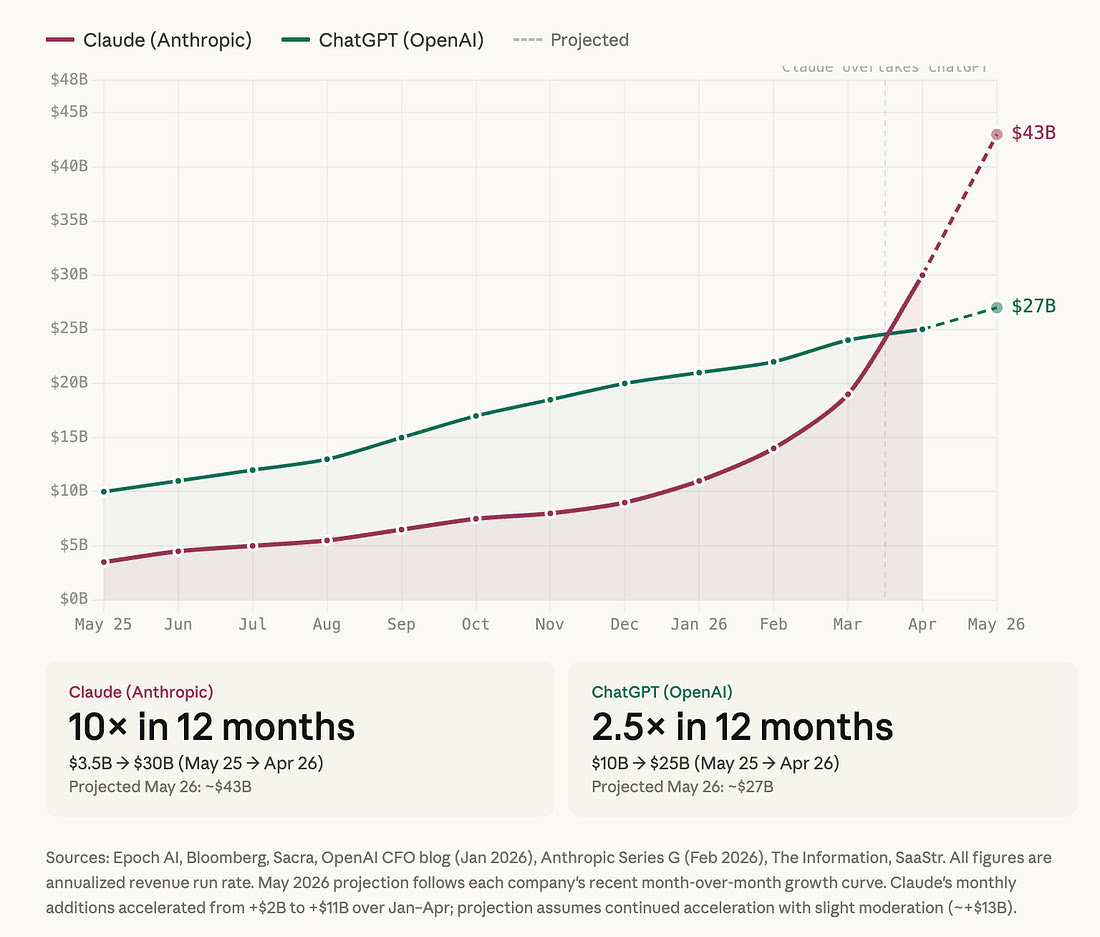
Yet, it feels like everybody is talking about it and only a few people are harvesting massive value that Claude Code can bring to GTM teams. And it was not only a hunch - as Kyle and I are surveying our community members most people use Claude for content creation.
To do the same thing as we’ve always done more effectively (productivity). But that is just stretching the potential that Claude Code can bring to GTM - the true mastery of AI GTM comes with remaging processes and building native agentic flows.
Previously we have covered context engineering, GTM campaigns, and today I want to bring you to the weeds on how best-in-class teams such as Linear, Descript, and Canvas are building signal-driven GTM systems that actually compound over time. And we won’t stop there - you’ll get a neat GitHub repo that you can use to build your v01 of truely agentic GTM systems without relying on 20 other expensive internal tools.
So let’s go for this ride. Meet your driver Nico Druelle from The Revenue Architects and let’s do this!
When we start working with a new GTM team, we do the same thing every time: we ask to see how they use AI in their day-to-day work.
The answer is almost always the same. Someone opens a chat window. They paste in their company description, a brief ICP summary, maybe a persona or two, and then type the task. Claude produces something reasonable. They paste a slightly different version next week. The context is rebuilt from scratch every single time, then disappears when the conversation closes.
The teams we work with — at a developer infrastructure company, a design platform used by professional studios, and a half-dozen others in between — don’t work that way. Their AI has context before the session starts. It knows their ICP, their tier definitions, their signals, their competitive positioning, their current campaigns. The team doesn’t explain their GTM to Claude — Claude already knows it.
The difference isn’t the AI model or the tools. It’s that they built a repository.
What a GTM Repository Is
The concept is simpler than it sounds: a set of markdown files in a git repository that captures your GTM institutional knowledge in a structured, queryable form. Your ICP definition. Your signal library with detection methods and scoring. Your competitive battlecards. Your buyer personas with outreach hooks. Your workflow documentation.
Claude Code reads these files automatically every time it starts a session in the repo. Once the context is there, any task — research an account, score a list, build a campaign — becomes a one-line prompt.
The engineering analogy is exact: you wouldn’t rebuild your data model in a chat window every time you needed to write a query. You wouldn’t re-explain your API contracts to every new engineer. The knowledge lives in the repo. People and tools read from it.
The best GTM teams figured out that revenue knowledge should work the same way.
Why Most Teams Haven’t Built This
Because there was never a forcing function. You can paste context into a chat window and get a usable output. It works, sort of, and the alternative — actually structuring your GTM knowledge into a maintained repository — feels like overhead.
What changes the calculation is accumulation. The first time you run a signal campaign with proper context behind it versus a generic prompt, the output is noticeably better. After six months of updating your signal library with performance data, your scoring model is calibrated to actual outcomes. After a year, a new hire can open the repo on day one and understand your ICP, your signals, your competitive positioning, and your current priorities without a single onboarding call.
That compounds. Generic prompting does not.
The Architecture
A well-built GTM repository has five layers.
CLAUDE.md — The Brain
The single most important file. Claude Code reads it automatically at the start of every session. It is the persistent context layer: ICP summary, top signals, positioning, team, current priorities. Everything else in the repo is referenced from here.
The failure mode: making it too long. CLAUDE.md should be scannable in two minutes. Deep detail lives in the context files it points to.
Context — Institutional Knowledge
Six files that capture your GTM strategy in structured form.
context/profile.md — Company overview, product, deal profile by segment, and reference customers. The foundation every other file builds on. If Claude needs to describe what you do in a research brief or a sequence, it reads this first.
context/icp-definition.md — Tier definitions with explicit criteria. Not “we target Series B SaaS companies.” That is a category, not a definition. A real ICP definition includes the employee range and why, the technographic signals that indicate fit, the organizational signals (does this function exist?), explicit anti-ICP exclusions, and a qualification framework with must-haves separate from red flags.
One pattern consistent across every high-performing team we’ve seen: they maintain an ICP evolution log. Every time the ICP changes — a filter tightened, a segment removed because it’s not converting — they record what changed and why. Six months of that log is more useful than the current definition.
context/signal-library.md — Signals with detection methods, point values, decay curves, and message hooks. Not “recently funded companies.” A real signal is: “Series B announced in last 60 days, detected via Crunchbase webhook into Clay, worth 30 points, decay to 15 points after 60 days, message hook: ‘Series B is the inflection point where the ops layer either scales or becomes the bottleneck.’”
Two concepts worth understanding before you build your signal library.
Signal decay. A funding event from 150 days ago is not the same signal as one from 10 days ago. The repo scores them differently — a Series B at announcement is worth 30 points; at 90 days it’s worth 15; at 180 days it’s worth 0. This matters because most teams don’t decay their signals, which means their “active list” quietly fills with accounts that were relevant six months ago and aren’t anymore. Decay forces the list to reflect actual urgency, not historical interest.
Signal combinations. Two signals together are more predictive than either alone, and score accordingly. A Series B plus a new RevOps hire in the same week isn’t a 65-point account — it’s an 80-point account with a combination bonus. The combination tells you something neither signal tells you individually: budget exists AND someone is actively rebuilding. The repo includes a combination table with bonus scoring rules and recommended actions for each pairing.
The signal library is also where performance gets tracked. Which signals are actually generating meetings? Which ones look good in theory but produce no pipeline? A signal library that isn’t updated with results is a hypothesis document. Updated with outcomes, it is a learning system.
context/positioning.md — The source of truth for how you talk about what you do. Value pillars with proof points, a messaging matrix by persona, and a “what not to say” section that prevents Claude from generating copy that sounds good but misrepresents your actual differentiation.
context/competitor-radar.md — Battlecards that are honest about where you win and where you lose. The most useful part of a battlecard is not the feature comparison. It is the pattern: “we win when X, we lose when Y, here’s the exact language that works when they bring up [Competitor] in a call.”
context/personas/ — One file per buyer persona. Title, decision role, what they measure themselves on, how they buy, what gets their attention, what gets ignored. The sample outreach hook calibrated to each signal is what Claude draws from when building any first touch.
Skills — Repeatable Execution
A skill is a markdown file that tells Claude how to run a specific GTM task using your context. Four skills cover most of the work.
Account Research — given a domain, produce a full intelligence brief: company snapshot, stakeholder map, signal score, competitive context, and a recommended angle with a specific first-line hook. This is what goes in front of the AE before any Tier 1 conversation.
Signal to Sequence — given a signal and target segment, produce a complete campaign: trigger logic, audience definition, full sequence copy across all touches, measurement targets. Ready to load into your outbound tool. A message passes if the prospect would find it valuable even if they never buy from you. Remove the CTA. If the message still has value, it passes. If it’s pointless without the ask, it’s a pitch — rewrite it. This single filter eliminates most of what makes outbound bad.
ICP Scoring — given an account or a list, score each one against your ICP definition and assign a tier. Runs on a single account in a minute or a batch of 500 in one session.
Weekly Update — reads the current state of the repo, identifies what’s stale, and drafts every section that needs updating. Run Monday morning. Claude produces the diff; you confirm the changes. Ten minutes instead of two hours.
Workflows — The Connective Tissue
Three documents that capture how the operational processes actually work. These are not for Claude to execute — they’re decision trees and process specs for the humans running the system.
workflows/enrichment.md defines the data waterfall: which sources run first, what data quality threshold triggers the next layer, what fields are required before an account moves to active sequences. It also covers email deliverability infrastructure — domain warming, sending limits per mailbox, bounce rate thresholds — because no amount of signal intelligence survives a blacklisted domain.
workflows/signal-routing.md is the decision tree that runs when a signal fires. Customer? Suppress. Active opportunity? AE owns it. Contacted in the last 45 days? Cooldown. Still active? Score, assign tier, route to the right sequence. Without this document, signals fire and outreach happens inconsistently — some get actioned immediately, some sit for a week.
workflows/campaign-build.md maps the full campaign process from audience definition through launch to measurement review: who approves the trigger logic, who writes the copy, what QA checks run before the first email goes out, when the first review happens and what you’re looking for.
Outputs — The Archive
Every research brief, campaign brief, and sequence that comes out of the repo lives in outputs/. Six months of outputs alongside the context files that produced them is a feedback loop: you can see how your thinking evolved, which campaigns worked and which didn’t, and how your ICP has changed over time.
What This Looks Like When It’s Working
Three patterns from teams we’ve worked with, anonymized.
The signal that rewrote the ICP. A developer tooling company had been targeting “VP of Engineering” as their primary persona for 18 months — it was the intuitive choice and it had always been in the deck. After building a signal library and tracking which signals actually converted, a pattern emerged, in a weekly-update run: accounts where a “Platform Engineering” or “Developer Experience” team had been created in the last 6 months converted at 4x the rate. Not a different company type. A specific organizational moment. The ICP update that followed — adding this as a Tier 1 organizational signal — changed the shape of their outbound entirely. They found it because they were measuring.
The battlecard that got rebuilt. A security software company had lost three consecutive deals to the same competitor without being able to explain why. Their battlecard was 14 months old. After a structured loss analysis — asking the losing AEs what the competitor said, what the champion reported back, what tipped the decision — they found that the competitor had made two pricing changes and was leading with a capability they had previously deprioritized. The updated battlecard changed the next four competitive evaluations. They won two.
The new RevOps hire who didn’t need onboarding. A B2B SaaS company hired a new Head of RevOps in January. Their GTM repository had been running for 8 months. On her first day, she opened the repo: ICP definition with a log of every change made over the prior 6 months and why, signal library with performance data attached to each signal, persona files with specific outreach hooks, and a full archive of campaigns run during her predecessor’s tenure with results documented. She ran the account research skill on her first 20 priority accounts in her first week. The onboarding conversation was about strategy, not context.
None of these are dramatic wins. That is the point. The repository compounds quietly. The gains show up in ramp time, in consistency, in the patterns that only surface when you’ve been systematically tracking outcomes.
Building Yours
We built an open-source starter kit with everything described above: the templates, five skills, three workflows, two playbooks, and a fully built-out example company (Relay, a fictional workflow automation platform) with every context file populated, real sample outputs, and a campaign with actual performance data attached.
Clone it. Run the setup skill. Start from a repo that already knows your company.
The order that works:
Run the setup skill first — provide your domain and Claude researches your company, writes every context file, and marks what was inferred versus confirmed. The repo is 70–80% complete before you’ve answered a question. If you want to sharpen the inferred fields, the skill offers a 3-minute refinement pass after showing you the results.
Run the ICP Scoring skill on your current pipeline — the gaps between what you expect and what it produces tell you where your ICP definition needs work. This is the fastest way to stress-test the context Claude just built.
Run the Account Research skill on your top 10 accounts — use the outputs as prep for your next conversations with those accounts. See what changes.
After your first few campaigns, update the signal library with results — this is what turns it from a hypothesis document into a learning system.
What it will not do: Write your strategy. The ICP definition template is structure, not thinking. The signal library is only as good as your knowledge of your actual win patterns. The repo amplifies what you know. It does not replace the work of knowing it.
Keeping It Current
Setup is one afternoon. The compounding happens in the maintenance — and it’s lighter than it sounds.
Weekly (5 minutes). Update the “Current priorities” section of CLAUDE.md. This is the only file that needs to change every week. What are you focused on this week? Which campaigns are live? What’s the most important thing Claude should know before any session this week? Five minutes keeps the entire repo oriented to your current state.
After every campaign (15 minutes). Add results to the campaign output file — reply rates, meeting rates, which signals converted, which touches drove responses. This is the step most teams skip, and it’s why their signal library stays a hypothesis document instead of becoming a learning system. The signal library performance log only gets useful after you’ve run three or four campaigns and can see patterns across them.
After every win or loss (30 minutes). Update context/competitor-radar.md. What did the winning or losing AE hear? What did the competitor say? What tipped the decision? A battlecard updated in real time after a competitive deal is worth ten battlecards written in a quarterly planning session from memory.
Quarterly (1 hour). Review context/icp-definition.md and add an entry to the ICP evolution log. Did anything change? A segment that’s not converting? A new company type that’s showing up in deals? The evolution log — what changed and why, with dates — is one of the highest-value artifacts in the repo. After a year, it tells you more about your ICP than the current definition does.
The total ongoing time commitment is less than two hours a week. The question is whether that time gets spent or not. Teams that maintain the repo have a self-correcting system. Teams that don’t are running on stale context, which is almost worse than no context — it generates confident but wrong outputs.
Automating the update loop. The manual version of this workflow is: open your outbound tool, pull the week’s reply and meeting numbers, open the repo, update the signal log, update the campaign results table, run the weekly-update skill. Twenty minutes if you’re disciplined. Zero minutes if you’re not.
OpenClaw closes that gap. It’s an open-source AI agent that runs on your machine, can read and write files, browse the web autonomously, execute shell commands, and message you on Slack. The pattern: configure OpenClaw to run on a schedule, have it pull metrics from your outbound tool via browser automation, update the signal performance log and campaign results files directly, then ping you on Slack with a summary and a prompt to run the weekly-update skill. You open Slack, see “here’s what changed this week, here’s what I updated, here are the three things I need you to decide” — and respond from your phone.
The human still makes the judgment calls. Whether to change the ICP, whether a signal is underperforming enough to cut, what happened in the competitive deal on Thursday — OpenClaw can’t know those things. But the data collection, file updates, and context preparation that surround those decisions become automatic.
The /weekly-update skill included in this repo is built for exactly this workflow. Run it manually on Monday morning, or let OpenClaw trigger it on a schedule. Either way: Claude reads everything, drafts every section that changed, and asks you to fill in the parts it can’t know. Ten minutes, not two hours.
The Bigger Point
The GTM teams pulling away right now are not running more outbound, spending more on paid, or writing better copy. They have built better context. Their AI has something to work with. Their signals are calibrated to real outcomes. Their new hires don’t start from zero.
The repository is not the point. The institutional knowledge is the point. The repository is just where you put it — so it doesn’t walk out the door when someone leaves, doesn’t disappear when the Slack thread scrolls away, and doesn’t have to be rebuilt every time you run a new campaign.
Build it once. Update it when things change. Let it compound.
Get the Starter Kit
GitHub: github.com/KarlRaf/gtm-starter-kit
What’s included:
CLAUDE.mdtemplate (pre-structured, not a blank form)6 context templates: company profile, ICP definition, signal library, positioning, competitor radar, persona
5 skills: Setup (auto-populate from domain), Account Research, Signal to Sequence, ICP Scoring, Weekly Update
3 workflows: Enrichment (with deliverability), Signal Routing, Campaign Build
2 playbooks: New Signal Response, Competitor Switch
sync/folder with starter scripts for pulling campaign data into the repo automaticallyComplete example company (Relay) — every context file populated, two sample outputs, a live campaign brief with sequences and performance tracking
If you enjoyed this article, you can explore more about Claude Code and context engineering for GTM in these recent articles:
✅ Need ready-to-use GTM assets and AI prompts? Get the 100-Step GTM Checklist with proven website templates, sales decks, landing pages, outbound sequences, LinkedIn post frameworks, email sequences, and 20+ workshops you can immediately run with your team.
📘 New to GTM? Learn fundamentals. Get my best-selling GTM Strategist book that helped 9,500+ companies to go to market with confidence - frameworks and online course included.
📈 My latest course: AI-Powered LinkedIn Growth System teaches the exact system I use to generate 7M+ impressions a year and 70% of my B2B pipeline.
🏅 Are you in charge of GTM and responsible for leading others? Grab the GTM Masterclass (6 hours of training, end-to-end GTM explained on examples, guided workshops) to get your team up and running in no time.
🤝 Want to work together? ⏩ Check out the options and let me know how we can join forces.


