



This newsletter is sponsored by 1mind.
Buyers tell AI things they’d never tell a salesperson. “Send me more information” usually means “goodbye now” - and AI reads it correctly, while most sellers keep chasing a prospect who already checked out.
1mind analyzed hundreds of thousands of real enterprise buyer-AI conversations. Three findings stood out:
→ How someone talks to your AI predicts their seniority, function, and deal value within a few turns
→ In-market demand is far more concentrated than the “5% are ready” rule implies - and it shows in what buyers say, not a form
→ How buyers talk to your AI mirrors how they prompt AI to find you - conversation design and AEO are the same surface
Full report drops on a panel hosted by my good friend Jonathan Kvarfordt: AI Conversations that Convert.
Tuesday, June 30 at 12 pm EST. I’ll be there.

Dear GTM Strategist,
You’ve probably been there.
5,000 target companies that could benefit from your solution. A sequence you wrote and rewrote until it sounded exactly right to you. You’ve done housekeeping too - selected the most praised tools that promised great returns, verified emails and did everything the playbooks tell you to do.
Yet, when you hit play, nothing happened. No one cared.
Could we blame:
The subject line?
The sending tool?
The offer?
Not really - in a world where decision makers are bombarded with emails, DMs, and robocalls, it takes 2 seconds to make a decision whether a message is relevant to them. Whatever sounds like: “Hi, congrats on building the X company - you growth is impressive, but I realized you are completely neglecting Y - this is exactly why we build Z - to help companies like X grow faster. Worth a 15min chat? You can book a demo here.”... will be largely ignored.
So what makes your message relevant to someone right now?
There are two points of failure in most outbound campaigns we are receiving and analyzing:
You emailed the wrong people. Only 0.1% of regular cold email campaigns convert to a meeting (source). The list wasn’t matched to anyone in real pain. It was just big.
The second failure is the one nobody admits. Even when you did reach a real buyer, you had nothing to say to them. You pulled the same signals everyone else pulls - the funding round, the job change, the LinkedIn post. Your “personalized” email opened exactly like the other nine in their inbox that morning. 🥱 This is not real personalization.
Everyone has the same AI models, the same enrichment, the same signals. The context you feed the machine is the only real moat left. And the only way to grasp relevant context is to DYOR - do your own research. That is the only way you’ll have something relevant to say to your people. Attention is deserved - not granted.
Yes - this is a post about the good boring research layer. About the 80% of outbound nobody talks about, and the half that makes a real difference in campaigns.
What you will learn (in this order):
How to identify the right segment that cares about your solution now
How to get, enrich, and filter the data
How to score it and prepare for campaigns
How to write the message that makes the buyer think, “wait, how do they know this about my market?”
Claude Code will be our super-assistant all along the way.
Quick note on the “we.” I handle the GTM strategy. My partner Anže Voje and his team build these workflows in Claude Code and Clay, on live client campaigns. What follows is the method we run daily.
It starts with a question most teams never think to ask.
1) Identify the segment with the highest pain point
Before you build a single list, answer this: where does proof of your buyer’s pain actually show up? How can you constantly monitor for it?
Don’t start by prompting “Build me a list with VP of Sales at a 200-person SaaS company.” Our goal is to find VPs who are, right now, drowning - because drowning is the only condition under which a stranger picks up.
So, where does drowning show up?
Picture a company that posts 12 “Account Executive” openings in six weeks. This is a signal that a sales org is scaling faster than it can possibly ramp. And this is the exact moment when an enablement or onboarding tool flips from nice-to-have to must-have. So a job board will hand you these signals - and Claude Code is how you can do research and then source the right data.
Signals beat demographics every time, because a signal has a clock on it. And the clock matters more than people think: a funding round from 150 days ago is not the same signal as one from yesterday. Fresh pain converts. Act fast.
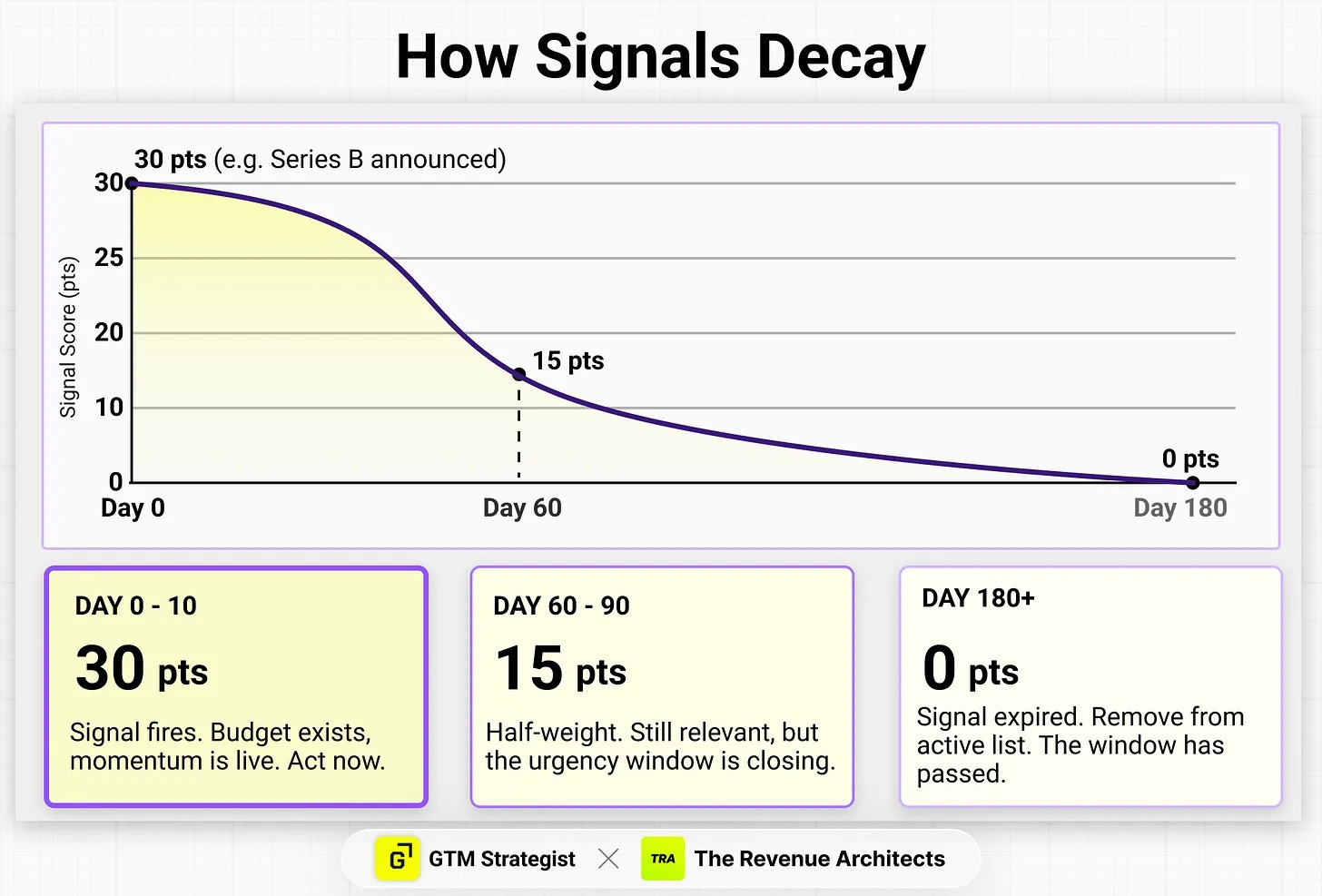
Data you pull from public databases needs further work. Expect 30 to 40% of any pull to be miscategorized - the wrong part of the value chain, consultants disguised as buyers, media companies, outdated headcount. That’s where the next step comes in.
2) Map where your signal lives
There are many sources when you can find good data online. Claude Code will help you strategize and select the right sources and, if you can get your hands dirty, also access the data.
In Claude Code, describe your product and ICP, then have it build and populate this matrix:
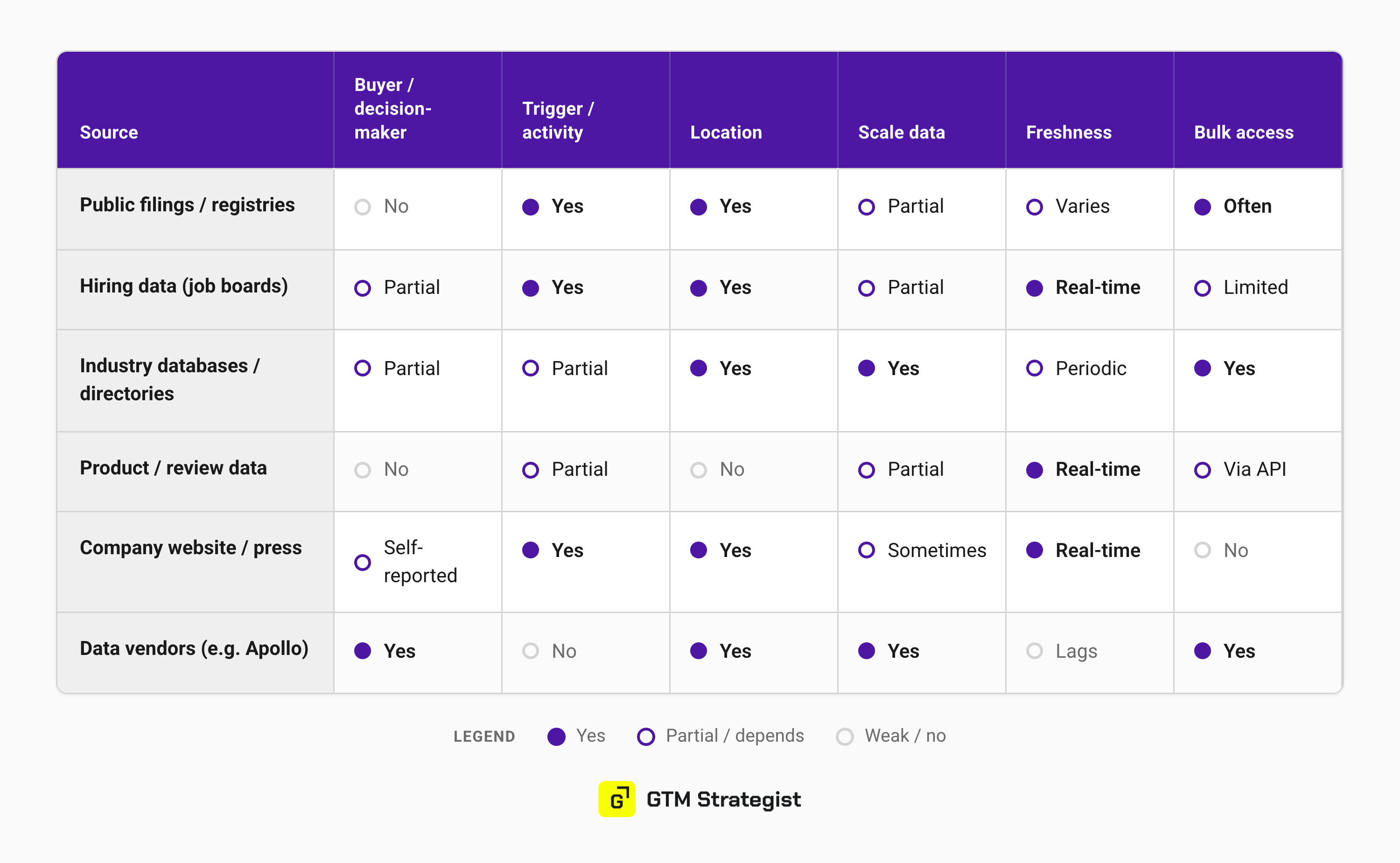
Here are some common source categories you should check:
Public filings and registries - permits, licenses, grants, regulatory disclosures, procurement records
Hiring data - job postings are among the strongest “active pain” signals; companies hire right before or right after the pain becomes real
Industry databases and association directories - membership lists, certified-partner lists
Product and review data - G2/Capterra, app-store changes, integrations added or removed
Self-reported activity - the company’s own site, press releases, conference appearances and exhibitor lists
Data vendors/aggregators - broad coverage, but noisy and often stale; best for firmographics, weak for triggers
3) Find the right contacts with Claude Code
That hiring surge tells you a company is in pain. It does not tell you who to email. The 12 postings are signed by “Talent Acquisition,” not by the VP who owns the number and the budget.
This pattern repeats in almost every market:
No single source holds both “who the buyer is” and “what they are doing right now”.
You always operate with two separate lists:
First, you build a list of target companies
Then, you look for target contacts within these companies.
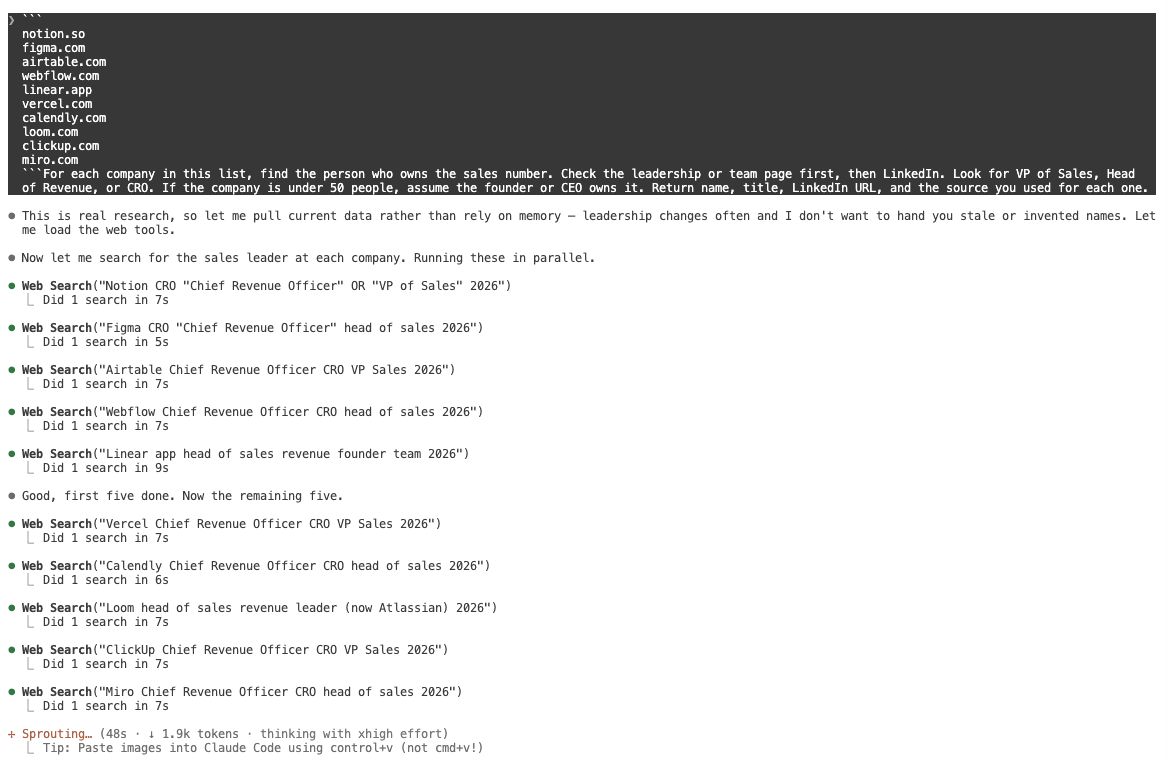
To find the right target contacts, ask Claude Code for a person - ask it to work backwards from the company. You already have the domain (URL) from step 2. Now point it at where decision makers are actually listed.
Here’s an example of a prompt you can use:
For each company in this list, find the person who owns the sales number. Check the leadership or team page first, then LinkedIn. Look for VP of Sales, Head of Revenue, or CRO. If the company is under 50 people, assume the founder or CEO owns it. Return name, title, LinkedIn URL, and the source you used for each one.
Claude Code goes company by company - reading the leadership page, cross-checking the title on LinkedIn, and flagging where it had to infer versus confirm. That last part matters: you want to know which names are solid and which are educated guesses before you spend a send on them.
If you subscribe to any databases, like Apollo, connect them to Claude Code (via MCP - just type /mcp), and Claude will include these sources in research.
My go-to tool for research in Claude Code is Exa. Exa was built for AI agents, not humans, so it searches by meaning instead of keywords. You can hand it a messy query like “companies that posted 10+ AE openings last month and just raised a round” and it returns the actual page content, not ten links to scrape - so Claude can work with the output right away.
If you target larger companies, it’s often not just one person, but a buying group. So tell Claude Code to map the group:
For any company with over 200 employees, identify 2 to 3 people in the buying group: the economic buyer who signs off on the budget, the champion who feels this pain daily, and the user whose workflow your product touches. Note each person’s likely role in the decision.
This is exactly the work Claude Code is the superior tool for this type of work - it reasons across mismatched sources to construct the person that is not listed elsewhere.
When you get the list, you can ask Claude to export it as CSV, to Google Sheet… however you want it.
4) Now score it, or you’ll drown in your own list
So now you have your list and your contacts. The next step is to get ready for the campaign. You will be tempted to just send a “email blast” to the whole list. But - take a deep breath. You don’t want to burn all your chances immediately. And you want to be especially prepared for the top potentials and personalize the message to them.
That’s where lead scoring comes in. Don’t skip it.
Here is an aggregate example of a scoring table that we use in our campaigns:
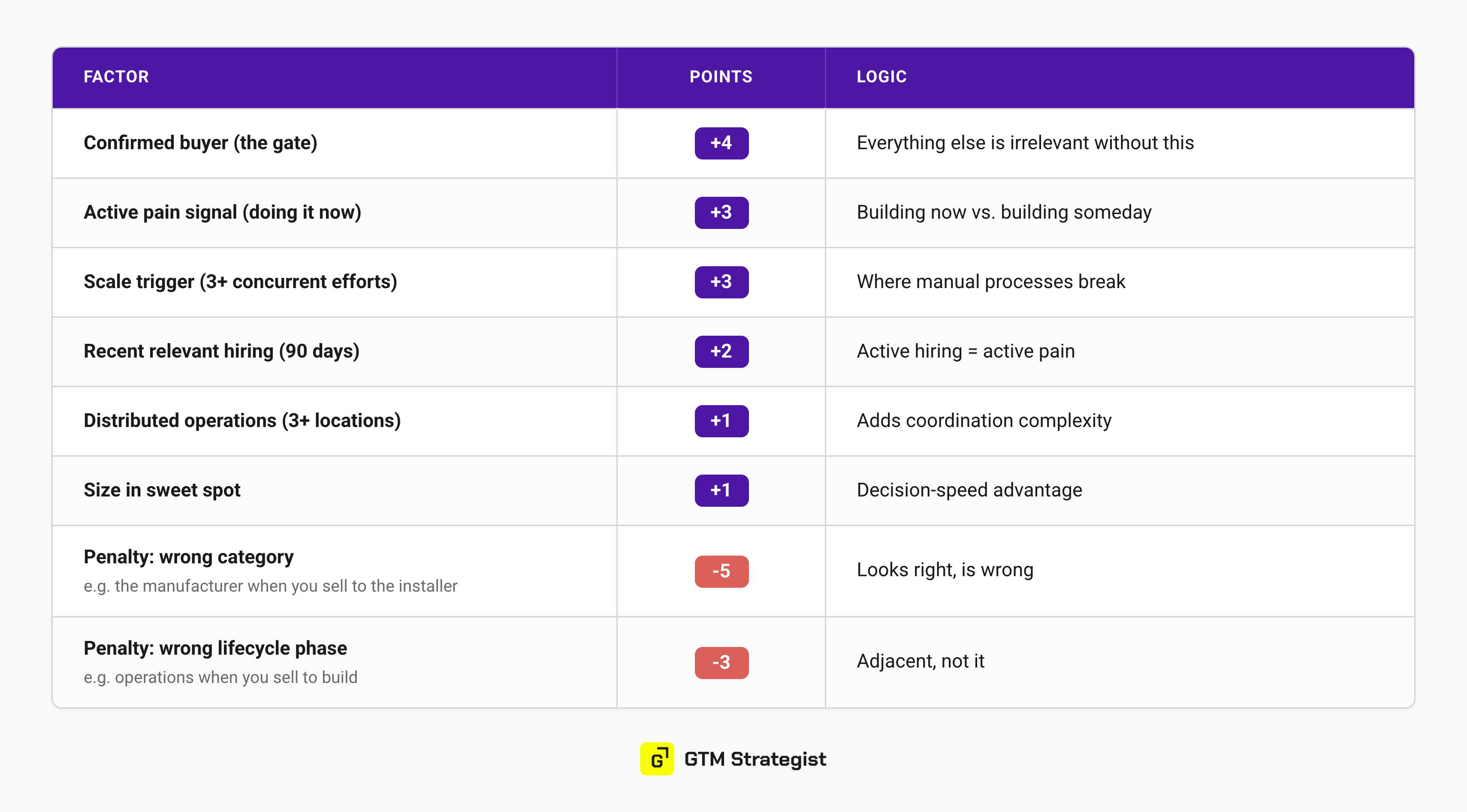
Adjust it to your needs, but make sure to keep two components that make this lead scoring model very powerful
Signal stacking: a Series B plus a new RevOps hire in the same week is worth more than either alone, because together they tell you budget exists and rebuilding is underway. T
Penalties: Noisy lists overflow with things that pattern-match to your buyer and are categorically wrong - the manufacturer when you sell to the installer. Punish those hard and the list cleans itself.
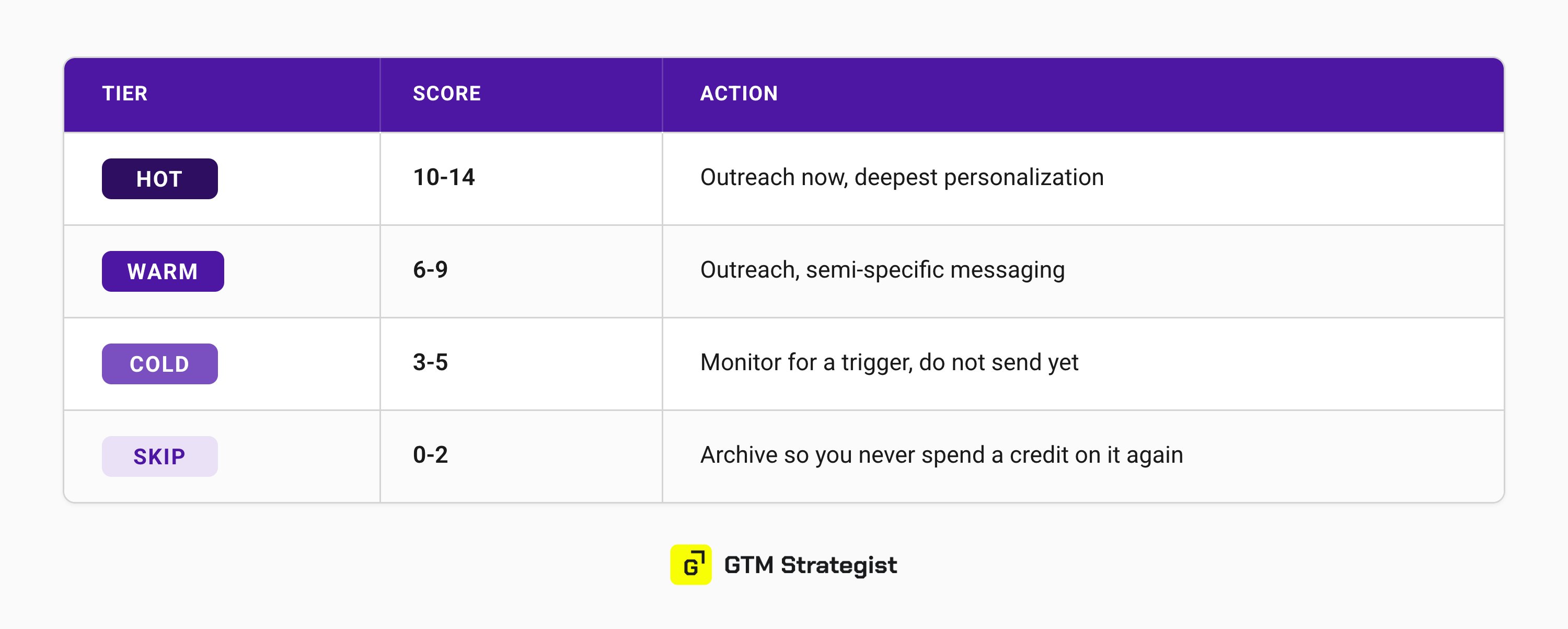
Then sort into four buckets: HOT goes out now with your deepest personalization. These emails deserve your manual review and tweaking. Think of contact-specific resources and information you can mention. Can you provide a report or a demo for them that can give them a taste of how specifically you can help them? Do it!
With WARM contacts, you can proceed with a lighter touch. At COLD contacts, you watch for a trigger - the right timing to send. SKIP you archive so you never spend another credit on it. Here’s an example for a 14-point model.
Earn the reply
All this research buys you one thing: the right to be specific. And specificity is the whole game, because everyone is fishing the same pond with half-baked messages. The fix is to go deeper than the surface signal everyone shares, until your message carries something they cannot get anywhere else.
We have to deserve their attention by providing something valuable to them at the right time. Aim for a message that is valuable on its own, whether they buy or not. Market intelligence disguised as outreach. And remember - the first message should be all about them. Don’t pitch slap, don’t write extensively about you and your company. Just earn the reply and the right to continue the conversation.
The bar is simple: would this email be worth their time even if you were selling nothing? If yes, you have earned the reply. If no, you are probably being ignored.
The reaction you are hunting for is one sentence: “How do they know this about my market?”
That’s why Claude Code is the best for research, because you can combine your knowledge of the industry (your knowledge base) with specific about the contact - and use that information for personalization.
For the full picture, reference the trigger, the names, the number, and try to name their exact situation.
Three layers in every first touch:
Lead with what you saw.
Support it with the figure that’s true at their size.
Ask a genuine question - not a meeting request wearing a trench coat.
Good: “Am I reading this right, or does your team already have this handled?”
Weak: “Got 15 minutes Thursday?”
The first one opens a conversation. The second one asks a stranger for a favor.
We went deep on this idea with Jordan Crawford, the king of the PVP framework: building campaigns your prospects would pay to receive - if you want the full version.
How this runs in Claude Code
We already shared some prompts and examples, but now that you know the order, let’s get even more specific on how it happens in Claude Code - and how to make it compound instead of starting from scratch every campaign.
First, give Claude Code somewhere to think from. A plain project folder it reads at the start of every session. This will be your GTM repository:

We already published a detailed guide on how to build your GTM repository, aka your GTM brain - find it here.
Next, fill this folder with all your knowledge: ICP definitions, messaging documents, product decks, signals… All the research you’ll further do with Claude Code should write back here.
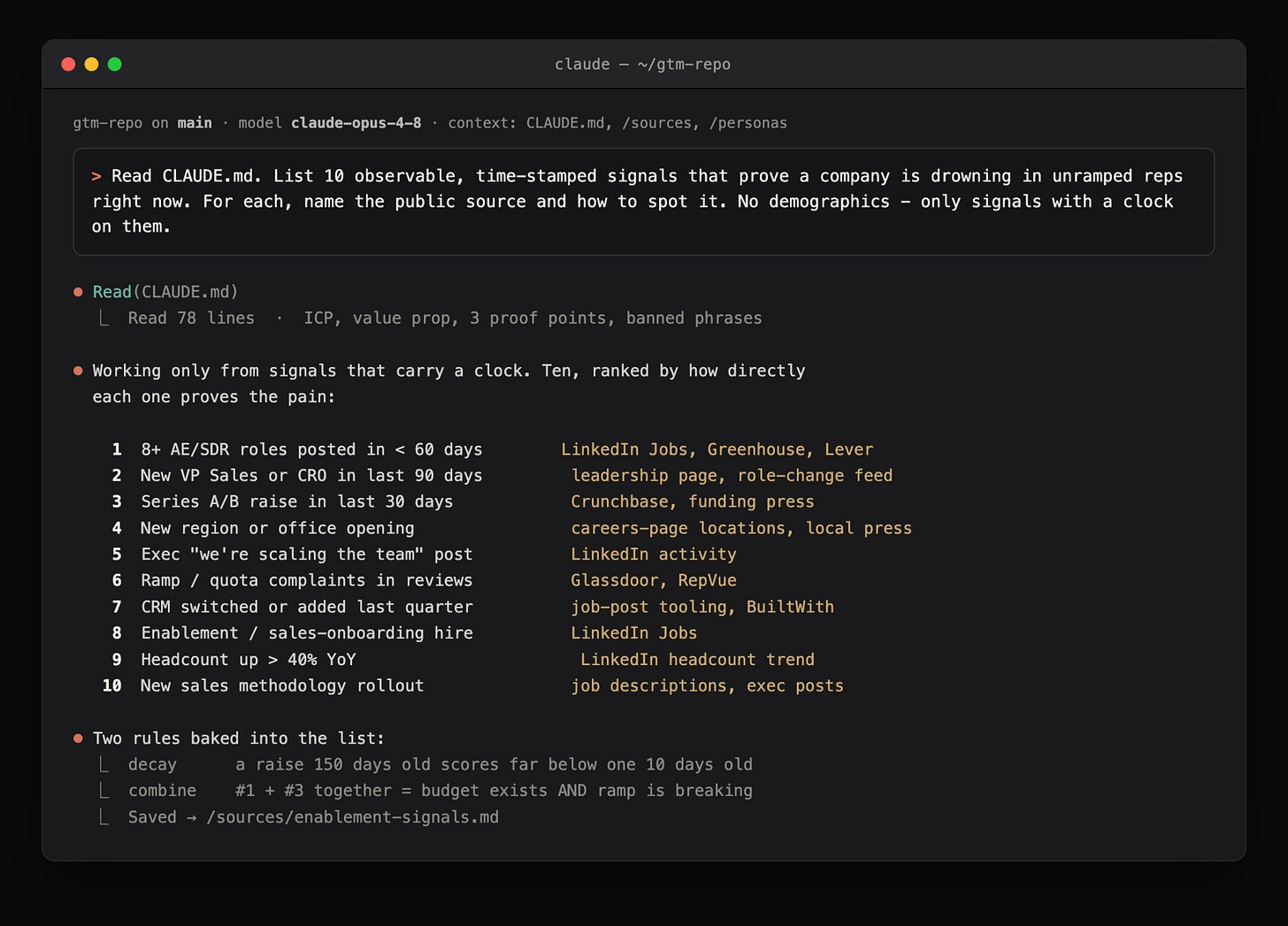
Research: turn the ICP into signals. Research based on job titles and company size is not enough.
Ask Claude where the pain shows up. Example of a prompt:
Read the ICP definitions. List 10 observable, time-stamped signals that prove a company is drowning in unramped reps right now. For each, name the public source and how to spot it. No demographics - only signals with a clock on them.
You get a ranked signal list and a source map, saved to the repo.
Then source the list: Point these signals at the live source and let it pull, clean, and cross-reference in one pass:
Example:
Take the top 3 signals from the list you just built. For each one, search the public sources you mapped - use Exa for web research and any databases connected over MCP - and pull every company currently showing that signal. For each company, return: name, domain, the specific signal it fired, the source URL where you found it, and the date the signal appeared. Only keep companies that match our ICP - drop staffing agencies, consultancies, media companies, and anything in the wrong part of the value chain. Skip any signal older than 90 days. If a company shows more than one signal, list all of them on the same row. Write the results to companies.csv, one row per company.
Next, find the right contacts at these companies. We covered that at step 3. The goal is to get contacts.csv file with the actual contacts you can contact.
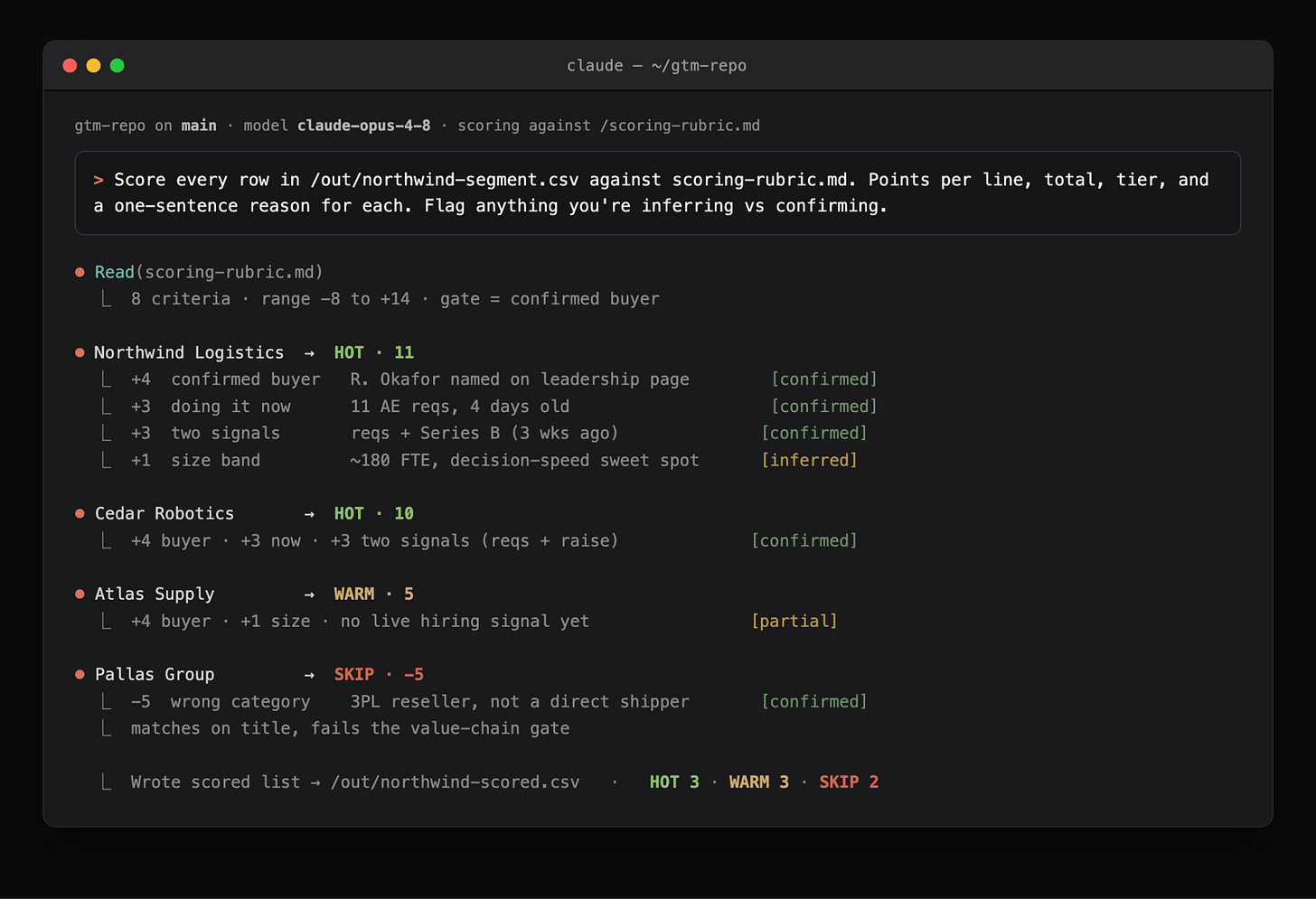
And finally, score these leads according to the model you set.
Here’s an example prompt based on the logic presented earlier in the article:
Score every contact in contacts.csv against scoring-rubric.md. Apply both the positive factors and the penalties. For each row, show the points awarded per factor, the running total, the tier (HOT 10-14, WARM 6-9, COLD 3-5, SKIP 2 or below - including any negative totals from penalties), and a one-sentence reason. Flag every factor you’re inferring versus confirming from a source. Sort by total, highest first, and write it back to scored-contacts.csv.
HOT is the only tier you personalize by hand, so Claude Code’s job here is to draft, not send. You feed it the same evidence you scored on, plus your repo, and have it build each message on the one specific thing you already know about that company.
Example:
For each HOT contact in scored-contacts.csv, draft a first-touch message. Open with the signal and source on their row - lead with what we saw, not who we are. Pull one proof point or benchmark from the repo that’s true at their company size. Close with a single genuine question, not a meeting request. Keep it under 90 words, no pitch. For each draft, note which signal and which proof point it’s built on so I can verify before sending.
Four rules to hold the line:
Draft, don’t automate. Claude Code gets you to 80%. The top tier earns the last 20% you add by hand - the detail the model can’t see from a row in a CSV.
One signal, deep. Build on the single sharpest thing you found, not five shallow data points stacked together. Depth is what reads as “they actually looked at us.”
Pass the test before it sends. Would this email be worth their time even if you were selling nothing? If no, it’s not ready.
The first message is all about them. No company backstory, no feature list. Earn the reply, then earn the right to continue.
Then, and only then, think about automation
By the time automation is even on the table, the hard part is behind you. But here’s the line we don’t cross: the first 50 messages to your hottest leads get reviewed and sent by hand. Every single one. Hand that step to a machine and you’re back to low reply rates this whole process was built to escape.
Everything below HOT is what you can automate. Once the thinking is done, WARM and COLD can orchestrate through Clay as the execution engine, or proceed directly with the sequencing tool like Instantly for email or HeyReach for LinkedIn DMs. But that build is a story for another post. The full Signal-to-Pipeline playbook walks through how to take this into Clay and run it at scale.
The takeaway
Outbound stopped paying for volume. It started paying for homework.
The research used to take an analyst a week- most companies skipped it enirely and treated outbound as trial and error.
Now Claude Code does it in an afternoon. And if you want it to compound instead of starting from zero every campaign, you put it somewhere permanent - a context repository Claude Code reads automatically, so this quarter’s research makes next quarter’s sharper.
Do the thinking first. Don’t skip the research. Discover the patterns relevant for your industry and ICP. Then run it at scale. That order is the difference between a list that books a meeting 0.1% of the time and a pipeline that compounds.
We packaged the full method - including the templates, the source catalog, and the pre-launch checklist - into one free-to-access playbook you can run on your next campaign.
Now tell us: does your outbound start with a signal, or with a list? Let’s discuss in the comments.
Maja & Anze

✅ Need ready-to-use GTM assets and AI prompts? Get the 100-Step GTM Checklist with proven website templates, sales decks, landing pages, outbound sequences, LinkedIn post frameworks, email sequences, and 20+ workshops you can immediately run with your team.
📘 New to GTM? Learn fundamentals. Get my best-selling GTM Strategist book that helped 9,500+ companies to go to market with confidence - frameworks and online course included.
📈 My latest course: AI-Powered LinkedIn Growth System teaches the exact system I use to generate 7M+ impressions a year and 70% of my B2B pipeline.
🏅 Are you in charge of GTM and responsible for leading others? Grab the GTM Masterclass (6 hours of training, end-to-end GTM explained on examples, guided workshops) to get your team up and running in no time.
🤝 Want to work together? ⏩ Check out the options and let me know how we can join forces.
Good one, thank you!